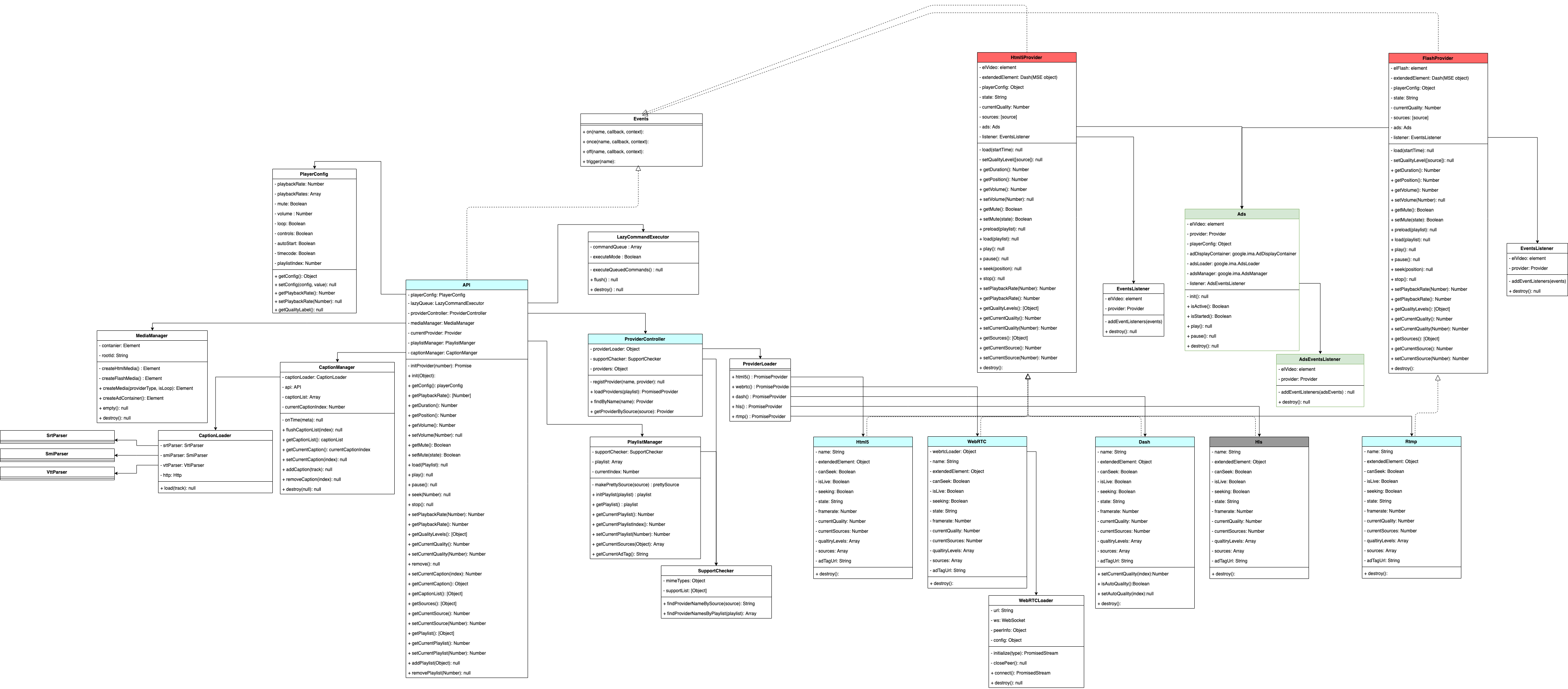
API Reference
getVersion()
playerInstance.getVersion()
This command returns OvenPlayer version information.
getConfig()
playerInstance.getConfig()
This command returns the configured option value when OvenPlayer is initialized.
| Attribute | Type | Memo |
|---|
| autoStart | Boolean | |
| browser | Object | |
| controls | Boolean | |
| loop | Boolean | |
| mediaContainer | DOMElement | |
| mute | Boolean | |
| playbackRate | Number | |
| playbackRates | Array Of Numbers | |
| playlist | Array Of playlist | |
| timecode | Boolean | |
| volume | Number | |
{
    autoStart: false
    browser: {screen: "1440 x 900", browser: "Chrome", browserVersion: "73.0.3683.103", browserMajorVersion: 73, mobile: false, …}
    controls: true
    loop: false
    mediaContainer: div.ovp-media-element-container
    mute: false
    playbackRate: 0.5
    playbackRates: [0.25, 0.5, 1, 1.5, 2]
    playlist: [{…}, {…}]
    timecode: true
    volume: 100
}
load()
playerInstance.load(playlist)
This command initializes OvenPlayer with a new playlist.
| Type | Memo |
|---|
| Array | playlist or sources |
playlist = [
        {
                title : "01",
                adTagUrl : "https://pubads.g.doubleclick.net/gampad/ads?...",
                image : "https://path.to/your_video_thumbnail.jpeg",
                duration : 7343,
                sources: [    {
                                  type : "mp4",
                                  file :  "https://path.to/your_video",
                                  label : "360P"
                              }],
                tracks: [{
                        kind : "captions",
                        file :  "https://path.to/your_caption.vtt",
                        label : "KO vtt"
                    }]
        },
        {
                        title : "02",
                        adTagUrl : "https://pubads.g.doubleclick.net/gampad/ads?...",
                        image : "https://path.to/your_video_thumbnail2.jpeg",
                        duration : 8333,
                        sources: [    {
                                          type : "mp4",
                                          file :  "https://path.to/your_video2",
                                          label : "360P"
                                      },
                                      {
                                          type : "mpd",
                                          file :  "https://path.to/your_video.mpd",
                                          label: "360P DASH"
                                      }
                        tracks: [{
                                kind : "captions",
                                file :  "https://path.to/your_caption2.vtt",
                                label : "KO vtt"
                            }]
                }
 ];

or

sources = [
{
        type : "mp4",
        file :  "https://path.to/your_video",
        framerate : 30,
        label : "360P"
    },
    {
        type : "mp4",
        file :  "https://path.to/your_video",
        framerate : 30,
        label: "480P"
    },

    {
        type : "mp4",
        file : "https://path.to/your_video",
        framerate : 30,
        label : "720p",
        default : "true"
    }
];
const videoElement = playerInstance.getMediaElement()
| Type | Memo |
|---|
| HTML Video Element | <video></video> |
getState()
playerInstance.getState()
This command gets information about what OvenPlayer is currently doing.
| Type | Memo |
|---|
| String | "idle", "paused", "playing", "error", "loading", "complete", "adLoaded", "adPlaying", "adPaused", "adComplete" |
getBrowser()
playerInstance.getBrowser()
This command returns the analyzed information from the user agent. However, this information is not necessarily correct because the user agent can hide or misleading information.
| Type | Memo |
|---|
| Object | User Agent Information |
{
        browser: "Chrome",
        browserMajorVersion: 73,
        browserVersion: "73.0.3683.103",
        cookies: true,
        flashVersion: "no check",
        mobile: false,
        os: "Mac OS X",
        osVersion: "10_14_0",
        screen: "1440 x 900",
        ua: "Mozilla/5.0 (Macintosh; Intel Mac OS X 10_14_0) AppleWebKit/537.36 (KHTML, like Gecko) Chrome/73.0.3683.103 Safari/537.36",
        webview: false
}
setTimecodeMode()
playerInstance.setTimecodeMode(isShow)
You can use this command to set whether the time-code or frame-code is displayed in the OvenPlayer control bar. However, if you want to use frame-code, the source must contain frame rate information.
isTimecodeMode()
playerInstance.isTimecodeMode()
This command checks whether OvenPlayer is currently running in time-code or frame-code.
| Type | Memo |
|---|
| Boolean | true : timecode, false : frame |
getFramerate()
playerInstance.getFramerate()
This command gets the frame-rate value of playing video. However, if you want to see frame-rate, the source or playlist must have information about frame-rate.
seekFrame()
playerInstance.seekFrame(frameCount)
This command moves the playback to frameCount.
| Type | Memo |
|---|
| Number | frameCount to move |
| Type | Memo |
|---|
| Number | Moved frameCount |
getDuration()
playerInstance.getDuration()
This command gets the duration of the content.
| Type | Memo |
|---|
| Number | In live-broadcast, mark as Infinity |
getPosition()
playerInstance.getPosition()
This command gets the current playing time of content.
getVolume()
playerInstance.getVolume()
This command gets the volume value set in OvenPlayer.
| Type | Memo |
|---|
| Number | 0 ~ 100 |
setVolume()
playerInstance.setVolume(volume)
You can use this command to control volume in OvenPlayer.
| Type | Memo |
|---|
| Number | 0 ~ 100 |
getMute()
This command gets if OvenPlayer is currently muted (or volume: 0).
setMute()
playerInstance.setMute(isMute)
You can use this command to set mute.
| Type | Memo |
|---|
| Boolean | muted or not |
play()
This command plays OvenPlayer.
If OvenPlayer is not ready to play, OvenPlayer will wait until it is prepared and then play.
pause()
This command pauses the playing content.
seek()
playerInstance.seek(position)
This command moves the playback to a position.
getPlaybackRate()
playerInstance.getPlaybackRate()
This command gets the playback speed information of content.
setPlaybackRate()
playerInstance.setPlaybackRate(playbackRate)
You can use this command to adjust the playback speed in OvenPlayer.
| Type | Memo |
|---|
| Number | Playback speed to change |
| Type | Memo |
|---|
| Number | Changed playback speed |
getPlaylist()
playerInstance.getPlaylist()
This command gets a registered playlist.
[
        {
                title : "01",
                adTagUrl : "https://pubads.g.doubleclick.net/gampad/ads?...",
                image : "https://path.to/your_video_thumbnail.jpeg",
                duration : 7343,
                sources: [    {
                                  type : "mp4",
                                  file :  "https://path.to/your_video",
                                  label : "360P"
                              }],
                tracks: [{
                        kind : "captions",
                        file :  "https://path.to/your_caption.vtt",
                        label : "KO vtt"
                    }]
        },
...
 ]
getCurrentPlaylist()
playerInstance.getCurrentPlaylist()
This command gets the index information of the playlist currently playing.
setCurrentPlaylist()
playerInstance.setCurrentPlaylist(playlistIndex)
This command changes the playlist currently playing.
getSources()
playerInstance.getSources()
This command gets information about sources from the playlist or sources of a single content currently playing.
[{
file: "https://bitmovin-a.akamaihd.net/content/MI201109210084_1/mpds/f08e80da-bf1d-4e3d-8899-f0f6155f6efa.mpd",
index: 0,
label: "MPD test",
type: "dash"
}]
getCurrentSource()
playerInstance.getCurrentSource()
This command gets the index information of the currently playing source.
setCurrentSource()
playerInstance.setCurrentSource(index)
This command changes the source of the playing content. It depends on your settings, but the protocol and video quality (resolution) will change by default.
| Type | Memo |
|---|
| Number | Configured source index |
getQualityLevels()
playerInstance.getQualityLevels()
This command gets a list of resolutions if the metadata in the playing content contains quality information. And it is available when using the MPEG-DASH protocol.
[
    {
        bitrate: 250000,
        height: 180,
        index: 0,
        label: "320x180, 250.0kbps",
        width: 320
    },
    ...
]
getCurrentQuality()
playerInstance.getCurrentQuality()
This command gets the index of the current video quality information.
setCurrentQuality()
playerInstance.setCurrentQuality(index)
You can use this command to set to play as index quality.
isAutoQuality()
playerInstance.isAutoQuality()
This command checks whether the video quality has been set to change automatically based on internet status, condition, and more.
setAutoQuality()
playerInstance.setAutoQuality(isAuto)
You can use this command to set whether to change the video quality automatically.
getCaptionList()
playerInstance.getCaptionList()
It reads the list of registered subtitles in the current playlist.
[
    {
    data : [VTTCue],
    file: captionUrl,
    id: "captions0",
    kind: "captions",
    label: "KO vtt",
    name: "KO vtt",
    }
]
getCurrentCaption()
playerInstance.getCurrentCaption()
This command gets the index of the using subtitle in the current playlist.
setCurrentCaption()
playerInstance.setCurrentCaption(index)
You can use this command to set the subtitle of the current playlist to the caption of the index.
addCaption()
playerInstance.addCaption(track)
You can use this command to add subtitles to the current playlist.
{
    kind: "captions",
    file: captionUrl,
    label: "KO vtt"
}
removeCaption()
playerInstance.removeCaption(index)
You can use this command to remove the subtitle corresponding to the index from the current playlist.
stop()
This command stops playing and moves the playback position to 0.
showControls()
playerInstance.showControls(show)
This API can show or hide the player's control area.
| Type | Memo |
|---|
| Boolean | set true or false to show or hide controls |
remove()
This command removes the player and releases all resources.
Architectures