RTMP Authentication
OvenMediaEngine Enterprise supports Username/Password Authentication when ingesting media sources through the RTMP Provider. This feature helps limit unauthorized users from accessing the stream.
RTMP Authentication Settings
You can use it by specifying <AuthFile> in <VirtualHosts><VirtalHost><Applications><Application><Providers><RTMP> of Server.xml. You can use it by setting it as follows:
<?xml version="1.0" encoding="UTF-8"?>
<Server version="8">
  ...
  <VirtualHosts>
    <VirtualHost>
      <Applications>
        <Application>
          <Providers>
            ...
            <RTMP>
              <AuthFile>AuthInfo.xml</AuthFile>
            </LLHLS>
          </Publishers>
        </Application>
      </Applications>
    </VirtualHost>
  </VirtualHosts>
</Server>
Since AuthFile is set in <Application><Provider><RTMP>, you can manage the list of accounts required for authentication for each Application, making it convenient to use.
If <AuthFile> is not specified or <Auth><Enabled> is set to false in the .xml file referenced by AuthFile (AuthInfo.xml), OvenMediaEngine Enterprise will receive RTMP streams without performing authentication as before.
Configure the Auth Info File
The content of the <AuthInfo.xml> file is in the form of <AuthInfo><Auth> with <ID>, <Password>, and <Enabled>. You can use it by configuring it as follows:
<AuthInfo>
    <Auth>
        <ID>username</ID>
        <Password>password</Password>
        <Enabled>true</Enabled>
    </Auth>
</AuthInfo>
ID: Specifies the user ID to authenticate. This corresponds to theUsernamein OBS Settings.Password: Specifies the user password required for authentication. This corresponds to thePasswordin OBS Settings.Enabled: If<Enabled>isfalse, OvenMediaEngine Enterprise will receive RTMP streams without authentication.
Using RTMP Authentication in OBS
When streaming RTMP using OBS, you can use the RTMP Authentication feature by enabling the Use autentication item in OBS Settings:
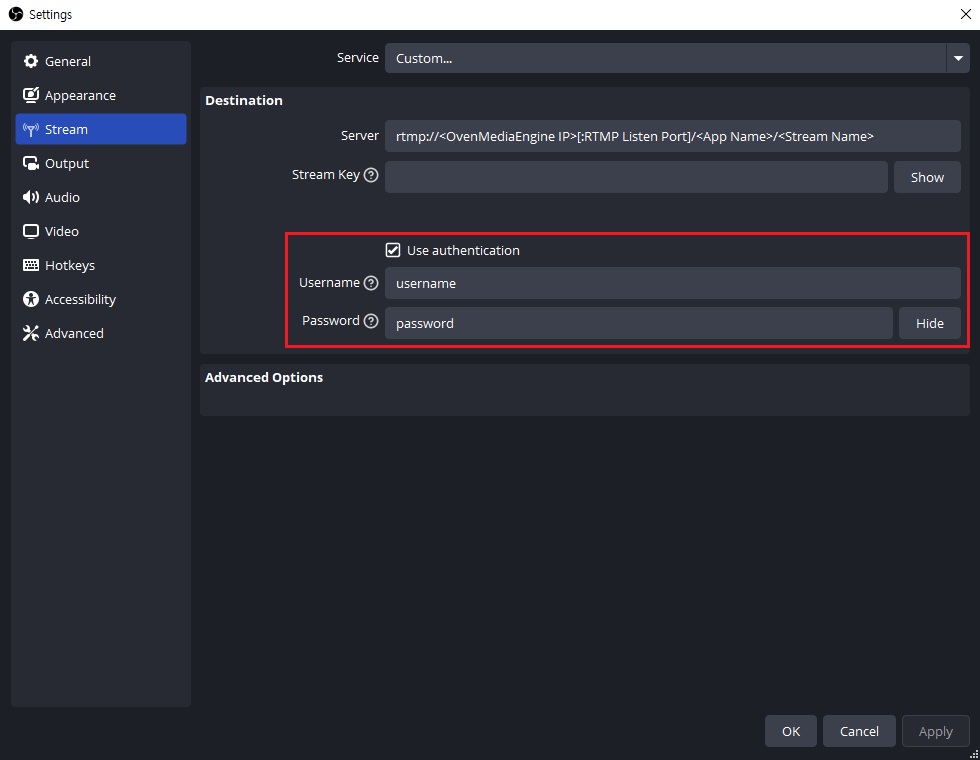
If you made an AuthInfo.xml file following the guide above and specified <AuthFile> in OvenMediaEngine Enterprise, enter the <ID> recorded in the AuthInfo.xml file for the OBS's Username and <Password> for the OBS's Password, then proceed to Start Streaming. If the authentication information matches, OvenMediaEngine Enterprise will receive the RTMP media source from OBS.