OvenMediaEngine Configuration for DRM
Protect LLHLS streams with the key material your DRM provider issues to you. You write it into a DRM info file, and OvenMediaEngine encrypts the streams with it and signals it in the playlists so players can obtain a license.
If your provider is DoveRunner, its key management service can issue the keys for you instead: see DoveRunner DRM Configuration.
Step 1. Enable DRM in the application
Turn DRM on in the LLHLS publisher of the application and point it at your DRM info file. <InfoFile> takes a path relative to the directory that holds Server.xml, or an absolute path.
<!-- /Server/VirtualHosts/VirtualHost/Applications/Application/Publishers -->
<LLHLS>
    <ChunkDuration>0.5</ChunkDuration>
    <PartHoldBack>1.5</PartHoldBack>
    <SegmentDuration>6</SegmentDuration>
    <SegmentCount>10</SegmentCount>
    <DRM>
        <Enable>true</Enable>
        <InfoFile>path/to/file.xml</InfoFile>
    </DRM>
    <CrossDomains>
        <Url>*</Url>
    </CrossDomains>
</LLHLS>
A stream reads the DRM info file when it starts, so a change to the file reaches new streams without restarting the server.
Step 2. Write the DRM info file
The file holds one or more <DRM> entries. Each entry states which streams it applies to and which key protects them. A stream uses the first entry it matches, so put more specific entries before broader ones.
<?xml version="1.0" encoding="UTF-8"?>

<DRMInfo>
    <DRM>
        <Name>MultiDRM</Name>
        <VirtualHostName>default</VirtualHostName>
        <ApplicationName>app</ApplicationName>
        <StreamName>stream*</StreamName>

        <CencProtectScheme>cbcs</CencProtectScheme>
        <KeyId>572543f964e34dc68ba9ba9ef91d4c4a</KeyId>
        <Key>16cf4232a86364b519e1982a27d90087</Key>
        <Iv>572547f914e34dc68ba9ba9ef91d4c4a</Iv>
        <Pssh>0000003f7073736800000000edef8ba979d64acea3c827dcd51d21ed0000001f1210572547f964e34dc68ba9ba9ef91d4c4a1a05657a64726d48f3c6899b06</Pssh>
        <FairPlayKeyUrl>skd://fairplay_key_url</FairPlayKeyUrl>
    </DRM>
    <DRM>
        <Name>MultiDRM2</Name>
        <VirtualHostName>default</VirtualHostName>
        <ApplicationName>app2</ApplicationName>
        <StreamName>*</StreamName>
        ...........
    </DRM>
</DRMInfo>
Stream matching
| Element | Description |
|---|---|
<Name> | A label for the entry. It is only used to tell entries apart. |
<VirtualHostName> | Virtual host the entry applies to. |
<ApplicationName> | Application the entry applies to. |
<StreamName> | Stream the entry applies to. Wildcards are supported, so stream* covers every stream whose name starts with stream. |
Key material
Your DRM provider supplies these values.
| Element | Required | Description |
|---|---|---|
<CencProtectScheme> | Yes | cbcs or cenc. See Protection schemes. |
<KeyId> | Yes | Key ID, 16 bytes in hexadecimal. |
<Key> | Yes | Content key, 16 bytes in hexadecimal. |
<Iv> | Yes | Initialization vector, 16 bytes in hexadecimal. |
<Pssh> | No | A protection system header in hexadecimal. Add one <Pssh> per DRM system you want to offer. |
<FairPlayKeyUrl> | No | Key URI for FairPlay. Required to offer FairPlay. |
<Keyformat> | No | FairPlay key format. Leave it out for FairPlay Streaming, or set it to identity to have the URI return the key itself. |
Choosing the DRM systems
Which systems a stream offers follows from what you provide rather than from a list you write. Each <Pssh> carries in its SystemID the system it belongs to, and <FairPlayKeyUrl> enables FairPlay.
| DRM system | How to offer it | SystemID |
|---|---|---|
| Widevine | Add its <Pssh> | edef8ba9-79d6-4ace-a3c8-27dcd51d21ed |
| PlayReady | Add its <Pssh>, whose Data field must carry the PlayReady Object (PRO) | 9a04f079-9840-4286-ab92-e65be0885f95 |
| FairPlay | Set <FairPlayKeyUrl> | 94ce86fb-07ff-4f43-adb8-93d2fa968ca2 |
Protection schemes
<CencProtectScheme> selects how the media is encrypted.
| Scheme | Description |
|---|---|
cbcs | AES-CBC with pattern encryption. Required for FairPlay, and supported by Widevine and PlayReady. |
cenc | AES-CTR full sample encryption. Supported by Widevine and PlayReady. |
Use cbcs when a single stream has to serve FairPlay together with other systems.
Step 3. Rotate the key (optional)
A stream can move to a new key while it runs, so a viewer who obtained one key cannot keep decrypting the stream indefinitely. List the keys in the order the stream should use them and state how often to move on.
<DRM>
    <Name>MultiDRM</Name>
    <VirtualHostName>default</VirtualHostName>
    <ApplicationName>app</ApplicationName>
    <StreamName>stream*</StreamName>

    <CencProtectScheme>cbcs</CencProtectScheme>
    <KeyRotationPeriod>600</KeyRotationPeriod> <!-- seconds -->

    <Keys>
        <ContentKey>
            <KeyId>572543f964e34dc68ba9ba9ef91d4c4a</KeyId>
            <Key>16cf4232a86364b519e1982a27d90087</Key>
            <Iv>572547f914e34dc68ba9ba9ef91d4c4a</Iv>
            <Pssh>0000003f707373680000...</Pssh>
            <FairPlayKeyUrl>skd://fairplay_key_url</FairPlayKeyUrl>
        </ContentKey>
        <ContentKey>
            <KeyId>...</KeyId>
            <Key>...</Key>
            <Iv>...</Iv>
            <Pssh>...</Pssh>
            <FairPlayKeyUrl>skd://fairplay_key_url</FairPlayKeyUrl>
        </ContentKey>
    </Keys>
</DRM>
| Element | Description |
|---|---|
<Keys> | Holds the keys as an ordered list of <ContentKey>. Each <ContentKey> takes the same key material as a single key does. |
<KeyRotationPeriod> | How many seconds of stream time to keep a key before moving to the next one. |
<KeyRotationPeriod> decides when the stream moves on.
| Value | Behaviour |
|---|---|
| Left out | The stream keeps one key from start to end. |
0 | No rotation on its own. The key changes only when asked for. |
Above 0 | The key changes every that many seconds, and can also be asked for in between. |
The keys form a cycle: after the last one the stream returns to the first. A stream reads the file when it starts, so keys added to the file afterwards are picked up by the streams that start from then on.
A rotation takes effect where the next segment of each track starts, which keeps every segment on a single key. Nothing is cut and no discontinuity is inserted, so playback continues across it. Segments already in the playlist keep the key they were encrypted with, so a player that is behind the live edge is unaffected.
<Keys> and a single flat key are alternatives. When <Keys> is present the key material on the <DRM> node itself is ignored.
Rotating on request (REST API)
A stream whose entry states a <KeyRotationPeriod> can also be moved to its next key at any moment, whether or not it rotates on a period of its own.
POST /v1/vhosts/{vhost}/apps/{app}/streams/{stream}:rotateDrmKey
The stream picks the new key up where the next segment of each track starts, the same as a rotation on a period. See Rotate DRM Key for the headers and the responses.
Checking Applied DRM
Checking applied DRM in Settings
To verify the DRM settings, click the Settings icon at the top right of the Web Console. In the displayed screen, select the Streaming tab and click on the LLHLS sub-item to view the DRM configurations.
Checking applied DRM in OvenPlayer
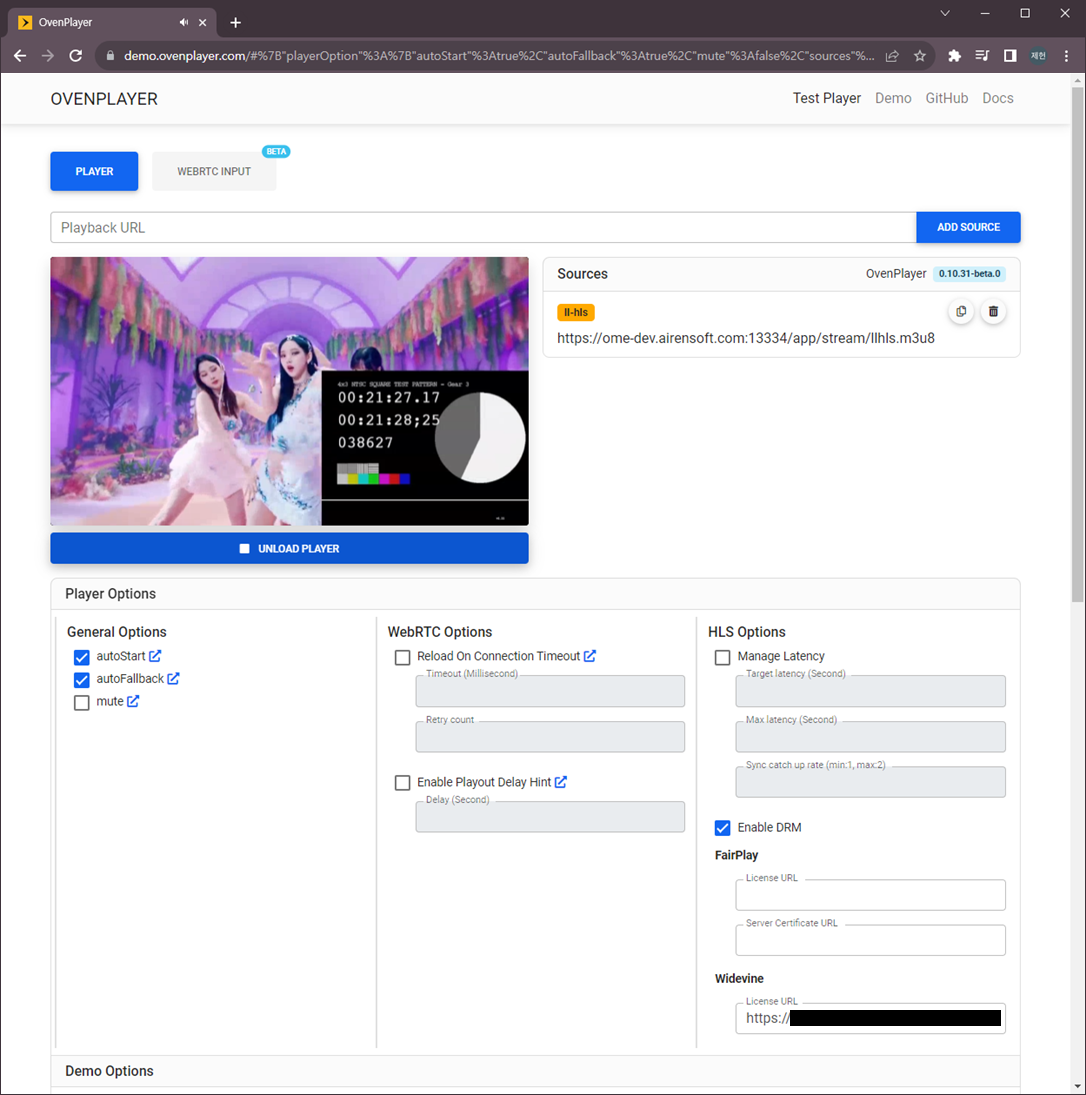
OvenPlayer Demo now includes the Enable DRM option. You can test the applied DRM using the Egress URL provided by OvenMediaEngine Enterprise.
To find the Egress URL, go to the Stream List in the Web Console and click on the generated Stream Box to enter the Monitoring screen. Then, click the URLs tab to view the Egress URL.
You can test DRM functionality by entering the Egress URL along with the License URL, Key, Value, and other required fields in the OvenPlayer Demo.