Measured capacity of a single OvenMediaEngine server: concurrent ingest streams, viewers, and H.264 transcoding channels on AWS EC2 and bare-metal hardware, across RTMP, SRT, WebRTC, and LL-HLS.
This is a performance report for OvenMediaEngine (OME), measured on real servers.
A few questions come up from almost everyone evaluating OME:
"How many live streams can one server ingest?"
"How many viewers can it serve?"
"How many transcoding channels can it run?"
Until now, the honest answer has been "it depends on your hardware and configuration." That is true, but it doesn't help much when you are trying to decide how many servers to provision. To provide concrete numbers, streams and viewers were added to a single OME server until it reached its limit, and the load that one machine could actually handle was recorded.
The tests were run on bare-metal servers and on AWS EC2 instances, a widely used cloud platform. Testing is ongoing, and new results will be added to this post as they become available.
Looking back at IBC 2026: OvenMediaEngine demos, conversations about the future of live streaming, a honey badger surprise, and our next stop at Inter BEE.
As we wrap up IBC 2026, we find ourselves looking back on more than just four days in Amsterdam. At our booth (5.B55), OvenMediaEngine brought together people from different corners of the industry, each with their own challenges, ideas, and visions for what live streaming could become.
Not every device can play AV1 yet. OvenMediaEngine solves this by delivering AV1 and H.264 from a single stream, so each viewer gets the codec their device can actually play.
AV1 delivers similar quality to H.264 at about half the bitrate. But if you serve only AV1, viewers whose devices cannot play it get no video at all. Support also varies by browser and by protocol (LL-HLS or WebRTC).
This post shows how to solve this with a multi-codec setup: OvenMediaEngine produces both AV1 and H.264 from a single input (H.264 or AV1), and each client picks the codec it can play.
If you have AV1 output running from our previous post, What Are the Benefits of AV1?, and are preparing a commercial service for a wide range of devices, the sections below walk you through checking device support, a multi-codec configuration, client-side codec selection, and a phased rollout.
What AV1 saves in picture quality and delivery traffic, why live AV1 needs a hardware encoder, and how to configure OvenMediaEngine to turn H.264 ingest into AV1 over LL-HLS and WebRTC.
AV1 can deliver the same picture quality as H.264 at about half the bitrate. For a live service, where delivery traffic grows with every viewer, that is the most direct way to cut CDN costs.
And you do not have to change how you broadcast: keep sending H.264 from OBS or your existing encoder, and let OvenMediaEngine convert it to AV1 for viewers.
If you are evaluating AV1 for a live service on OvenMediaEngine (OME), this post walks you through the numbers, the hardware you need, and a working configuration for LL-HLS and WebRTC.
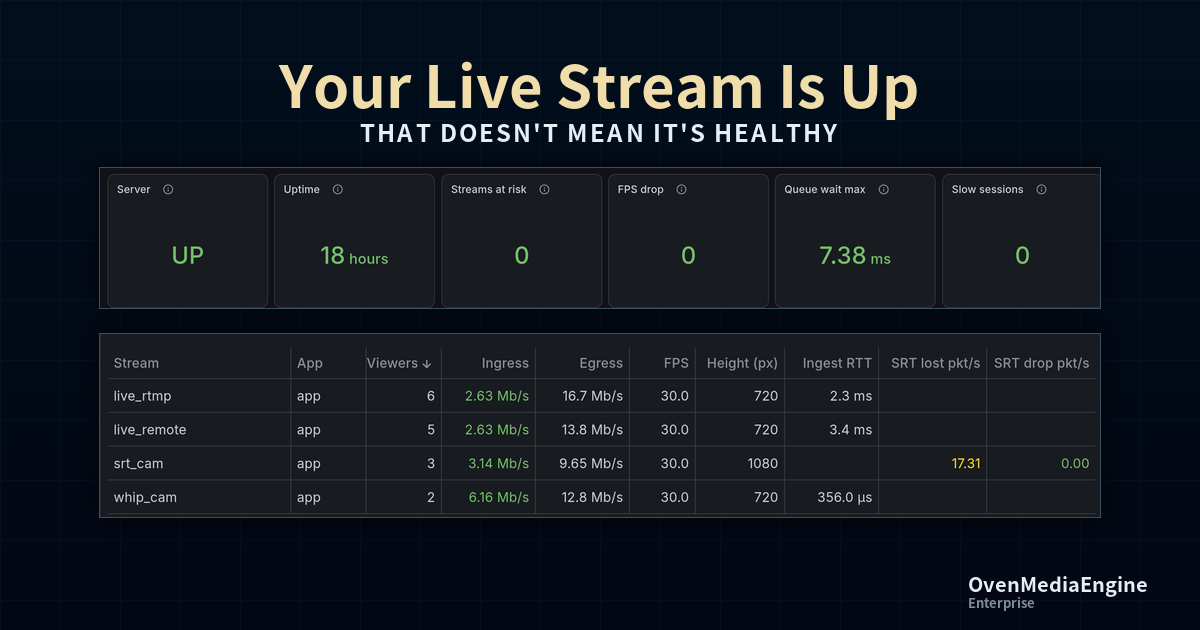
Many operators keep a player running and watch the broadcast to decide whether the service is healthy.
That is necessary work, but a player shows only the one rendition currently selected out of the several quality levels generated for the same broadcast.
All it tells you is that this one rendition looks fine over the network you happen to be using.
It cannot tell you whether only the transcoding step that produces 360p on the server is falling behind, whether only viewers in another region are buffering, or whether a backlog inside the server is accumulating into seconds of latency for viewers.
By the time something looks wrong in the player, viewer complaints have already come in.
While a broadcast is running, there are three things an operator actually wants to know.
Is the service healthy right now?
If it is not, what is wrong?
Is it an ingest problem (the direction from the encoder into the server), a server problem, or a problem for only some viewers?
Answering all three means seeing, in one place, the state of the input streams, the server's internal processing, and the traffic going out to viewers.
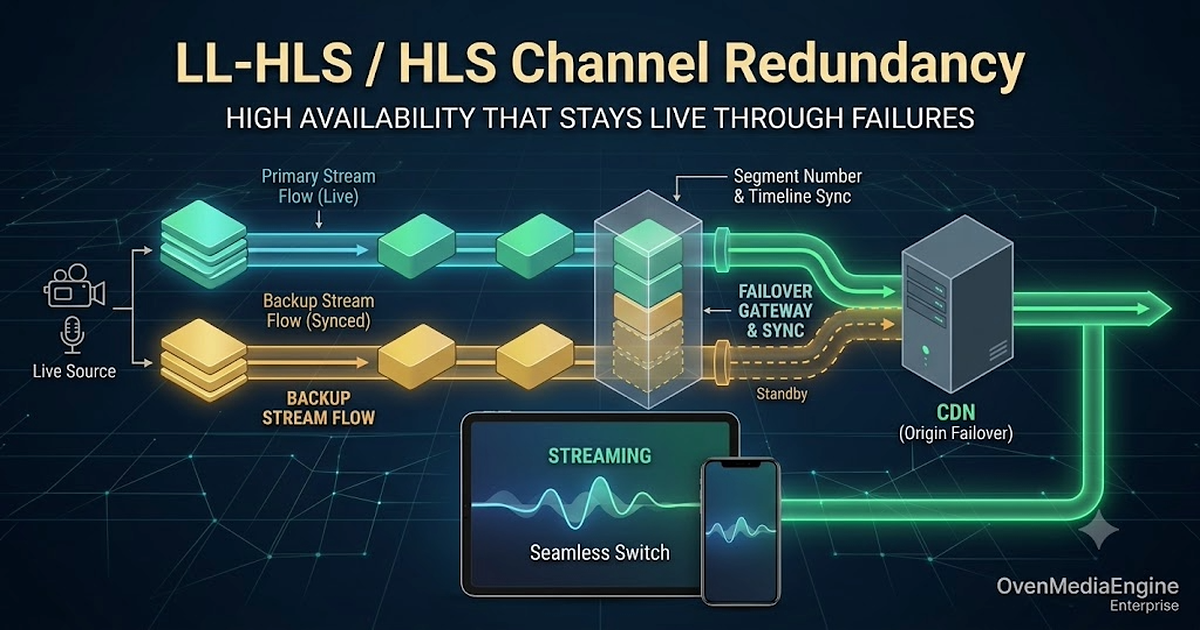
Making a live channel redundant comes down to one thing: keeping the output of the two Origins behind your CDN, Primary and Backup, synchronized so that the player can switch between them at any time and keep playing without interruption.
With VOD this is easy. The files are pre-rendered and static, so any Origin serves the exact same bytes, and putting Primary/Backup behind a CDN is all it takes. Live is different. Each Origin cuts the stream into segments in real time, so even when both receive the same broadcast, their output does not line up on its own.
This post covers what has to line up to make a live channel truly redundant, and in particular how to synchronize the encoder-origin path.
Hardware acceleration is removed from new open-source OvenMediaEngine releases after v0.20.5. Existing versions still work, while Enterprise retains support.
Starting with the next release, the open-source edition of OvenMediaEngine will no longer provide hardware-accelerated features, including hardware encoder integrations such as NVIDIA. This was a difficult decision, and we want to begin by thanking everyone who has relied on these features over the years and asking for your understanding. Software-based features, including software encoding, remain fully supported, and no other features are affected.
See how OvenMediaEngine pulls RTSP camera feeds only when viewed and delivers them via WebRTC, reducing idle resource use in large-scale CCTV monitoring.
RTSP has been the de facto protocol for IP cameras for over two decades. Almost every CCTV, IP camera, and network video device on the market speaks RTSP natively. It works well on dedicated NVR appliances and desktop clients. But the moment you try to bring those streams into a modern web or mobile dashboard, the cracks start to show.
The OvenMedia Labs blog is now hosted directly on our own domain. Going forward,
deep dives into sub-second latency live streaming, OvenMediaEngine release notes,
and field-tested guidance will all land here first.
OvenMediaEngine is an open-source and sub-second latency streaming server capable of handling large-scale and high-definition streams. It can be installed and used in various environments, such as servers, CDNs, and Clouds. Today, we will show you how to easily use OvenMediaEngine by installing Docker on an AWS EC2 instance.
Stay Up to Date with OvenMedia Labs
Get release notes, technical insights, and company news delivered to your inbox.
You're subscribed!
Thanks for subscribing. We'll keep you updated with the latest news from OvenMedia Labs.